> For the complete documentation index, see [llms.txt](https://docs.basedbot.app/llms.txt). Markdown versions of documentation pages are available by appending `.md` to page URLs; this page is available as [Markdown](https://docs.basedbot.app/web-app/webapp/settings.md).
# Settings
The Settings page lets you configure trading parameters, display preferences, and per-chain defaults. Access it from the account menu in the header.
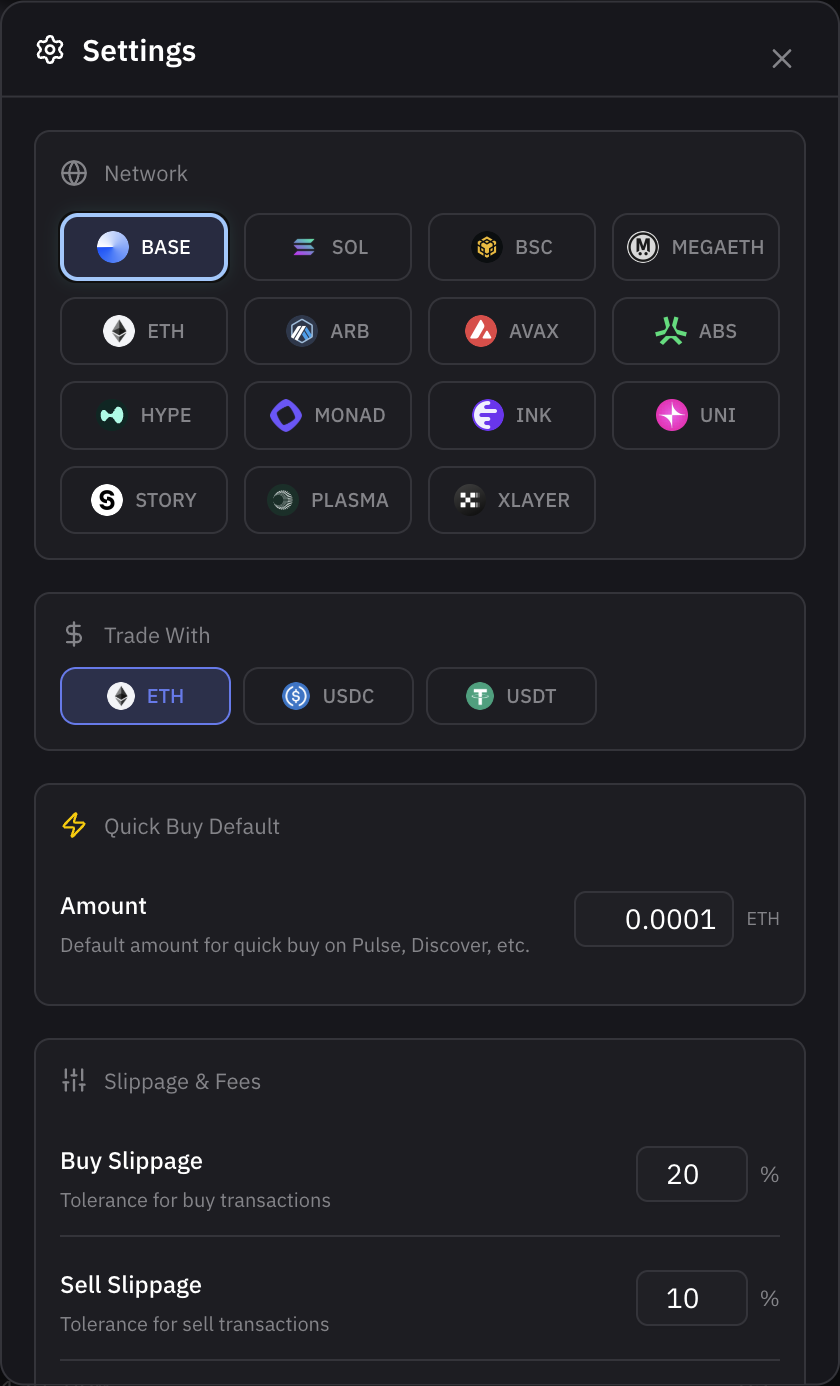
Trading Settings panel
## Per-Chain Configuration
Settings are configured independently for each chain. Select a chain at the top of the settings page to configure its specific parameters.
## Trading Settings
### Base Currency
Choose the default currency for buy orders on the selected chain:
* **Native token** (ETH, BNB, SOL, etc.)
* **USDC**
* **USDT**
### Buy Button Presets
Configure 3 preset amounts for the quick buy buttons in the trading panel. For example: 0.01 ETH, 0.05 ETH, 0.1 ETH.
### Sell Button Presets
Configure 3 preset percentages for the quick sell buttons. For example: 25%, 50%, 100%.
### Slippage
Set default slippage tolerance separately for buy and sell orders. Higher slippage increases the chance of execution but may result in worse prices.
### Priority Fee
Control transaction speed by setting the priority fee:
| Level | Description |
| ---------- | ------------------------------------------ |
| **Low** | Lowest fee, slower execution |
| **Medium** | Balanced fee and speed |
| **High** | Higher fee, faster execution |
| **Max** | Maximum priority for time-sensitive trades |
| **Custom** | Enter a specific gwei value |
### MEV Protection
Toggle MEV protection on or off. When enabled, your transactions are routed through private mempools to prevent sandwich attacks. Available on EVM chains.
### Max Price Impact
Set the maximum acceptable price impact for your trades. Orders that would exceed this threshold are blocked to protect you from excessive slippage on low-liquidity tokens.
## Hidden Tokens
Manage tokens you have hidden from your portfolio view. Hidden tokens do not appear in your positions list but can be unhidden at any time.
## Appearance
### Theme
Choose from 11 built-in theme presets. Access the theme selector from the bottom bar:
* **Based Dark** -- default dark theme with teal accents
* **Based Light** -- light theme
* **Axiom** -- dark theme with blue accents
* **GMGN** -- dark theme with green accents
* **DexScreener** -- dark theme inspired by DexScreener
* **Dusk** -- dark purple theme
* **Astro** -- dark emerald/green theme
* **Neo** -- dark cyan theme
* **Crimson** -- dark red theme
* **Stealth Blue** -- dark blue theme
* **Orange** -- dark amber/orange theme
### Theme Customizer
Access the theme customizer from the bottom bar to fine-tune individual colors (background, accent, buy/sell, candles, etc.) and font beyond the base preset.
---
# Agent Instructions
This documentation is published with GitBook. GitBook is the documentation platform designed so that both humans and AI agents can read, navigate, and reason over technical content effectively. Learn more at gitbook.com.
## Querying This Documentation
If you need additional information that is not directly available in this page, you can query the documentation by asking a question.
Perform an HTTP GET request on the following URL with the `ask` and `goal` query parameters:
```
GET https://docs.basedbot.app/web-app/webapp/settings.md?ask=&goal=
```
`ask` is the immediate question: it should be specific, self-contained, and written in natural language.
`goal` is what the user is ultimately trying to achieve, the reason they need the answer. Sharing it helps GitBook give you a better, more relevant answer. A goal is most helpful when it describes the outcome the user wants rather than restating the question. For example, with `ask=how do I create an API token`, a goal like `automate deployments from our CI pipeline` lets GitBook tailor the answer to that use case.
The response will contain a direct answer to the question and relevant excerpts and sources from the documentation.
Use this mechanism when the answer is not explicitly present in the current page, you need clarification or additional context, or you want to retrieve related documentation sections.